1
Say the change plainly
Ask for a cleaner background, a lighting change, a new composition, or a completely new image in everyday language.
PhotoSlop
Start with a photo or a blank idea, then describe what you want in everyday language. PhotoSlop uses AI to create or edit the image and keeps each version on your computer.
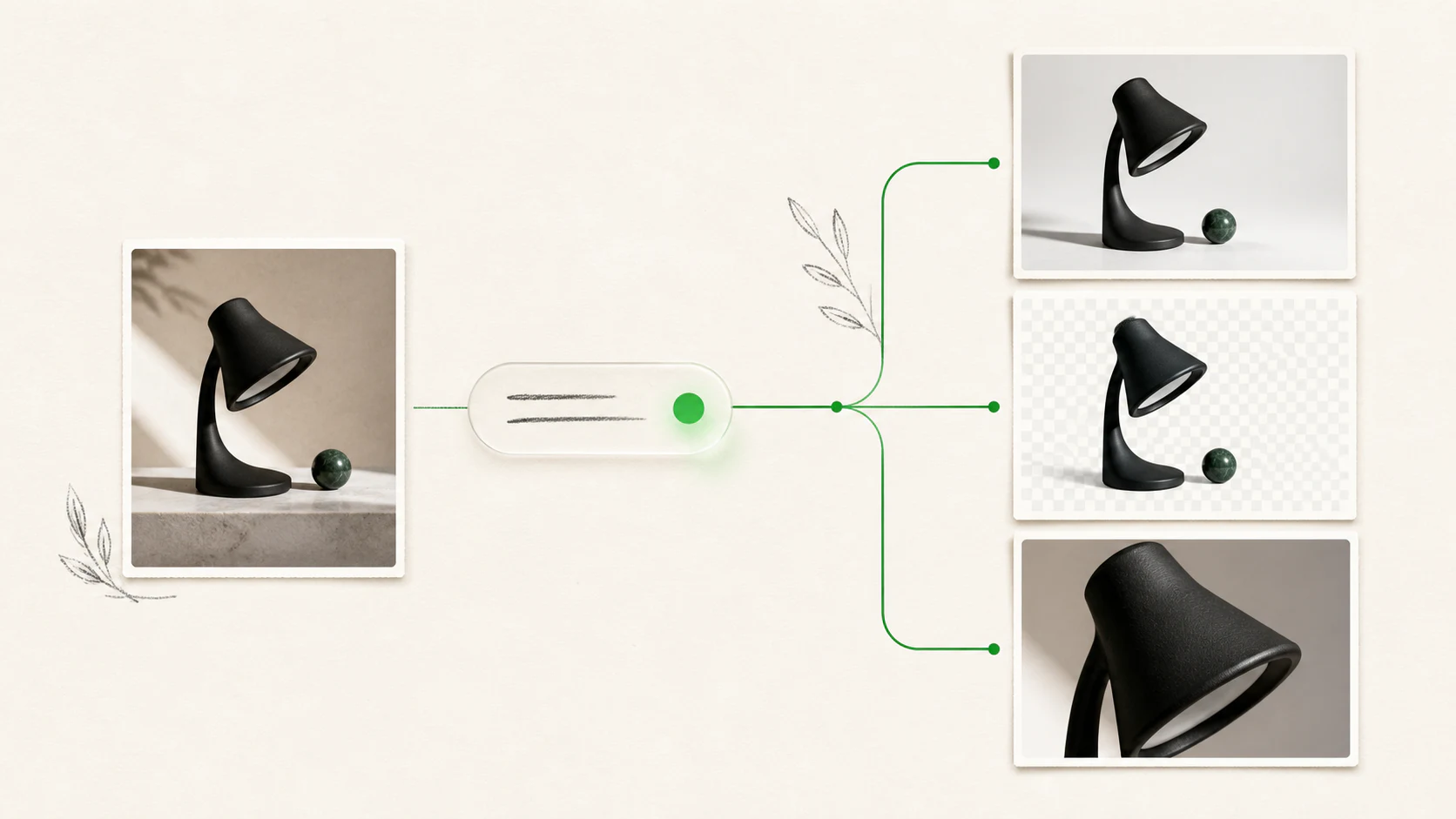
PhotoSlop hides the model choices and technical setup. You concentrate on the picture and the result you want.
1
Ask for a cleaner background, a lighting change, a new composition, or a completely new image in everyday language.
2
Successful creations, edits, and cutouts become local versions, so trying another idea does not erase the last one.
3
Save the visible version as PNG, JPEG, or WebP, with local 1K export and optional cloud-produced 2K or 4K output.
The core workflow stays the same whether you are creating from scratch or fixing a photo you already have.
Open a compatible image, create a blank project, or describe the first image you want PhotoSlop to make.
Type the change in plain language. You can also target a rectangular area when the request belongs in one part of the image.
Compare local versions, continue from the one you like, and export the visible result when it is ready.
Try the full app with your own work before deciding whether to pay.
Download PhotoSlop freePhotoSlop is built for people who need a convincing result without learning a professional design suite first.
Clean up distractions, adjust the setting, improve a portrait, or explore a better-looking version of an everyday photo.
Prepare product photos, marketplace images, simple ads, and cleaner visual variations for selling online.
Create social graphics, video thumbnails, website images, and presentation visuals around a clear idea.
Make flyers, invitations, simple brand assets, and other one-off visuals without starting from a complex canvas.
PhotoSlop treats a successful creation, edit, or cutout as a new version instead of replacing the current one. The original import remains preserved inside the local project.
That makes experimentation feel safer: go back, compare directions, and continue from the version that actually worked.
Open common still-image formats, then export the visible version in a practical format for sharing or continued work.
The current desktop builds reliably open these common still-image formats.
Choose the format that fits the finished image. PNG and WebP can preserve cutout transparency.
The file chooser also accepts HEIC and HEIF where the bundled image decoder can read them, but support can vary. PSD, RAW, CMYK, and prepress workflows are not part of PhotoSlop.
PhotoSlop keeps project folders, originals, versions, thumbnails, history, and ordinary 1K exports on your computer. Requested AI work uses a cloud image provider, so the boundary is clear rather than hidden behind a vague local-first claim.
Try three successfully delivered image creations, photo edits, or background removals before choosing a plan. The download itself needs no payment card.
For Apple silicon Macs running macOS 12 Monterey or newer.
Version 0.0.20
Download for Mac, Apple siliconFor Windows 11 computers with 64-bit x64 processors.
Version 0.0.20
Download for Windows, 64-bitChoose the Apple silicon Mac or Windows 64-bit package.
Every paid plan has the same features, image quality, local projects, version history, and export formats. Plans differ only by the number of AI image creations, photo edits, and background removals available each month.
US$10/month
50 successful image creations, photo edits, or background removals each billing month.
Download free firstUS$25/month
200 successful image creations, photo edits, or background removals each billing month.
Download free firstUS$50/month
500 successful image creations, photo edits, or background removals each billing month.
Download free firstPayment starts from the installed app and opens Stripe Checkout in your browser. There are no automatic extra charges, and unused creations or edits do not roll over. Cancelled subscriptions keep paid access through the current billing period.
Clear answers about files, privacy, free use, purchasing, and what PhotoSlop does.
PhotoSlop is a desktop AI image editor. You can create an image from a description, edit an existing picture with plain-language instructions, cut out a subject, compare local versions, and export the result.
One successfully delivered creation, edit, or cutout uses one AI action. Hidden routing, face detection, and provider fallback do not add extra customer-visible actions.
Opening and saving projects, importing images, moving through version history, local project work, and 1K, 2K, or 4K exports do not consume an action. A 2K or 4K export still starts a separate cloud upscale each time.
Provider failures and safety-blocked requests do not consume an action.
If you cancel locally after cloud processing has already begun, the provider may still finish and the action may count. PhotoSlop does not promise that every late cancellation can stop work already in progress.
Create starts a new image from a description. Edit changes the current working image. Cutout isolates a subject and can preserve transparency in PNG or WebP. Upscale produces a larger 2K or 4K export and does not create a project version by default.
The current desktop builds reliably open PNG, JPEG, WebP, and TIFF and export PNG, JPEG, or WebP. HEIC and HEIF appear in the chooser where the bundled decoder can read them, but support can vary. PhotoSlop does not currently target PSD or RAW workflows.
No. Imported originals remain preserved in the local project, and successful creations, edits, and cutouts become separate versions. Export writes a new file to the location you choose.
Project folders, imported originals, working and generated versions, thumbnails, previews, history, and ordinary 1K exports stay local by default. Nunuworks does not provide hosted PhotoSlop project storage or project sync.
For a requested cloud operation, PhotoSlop sends the prompt and only the normalized working image, selected area, or references needed for that operation through the Nunuworks gateway to the configured image provider. A 2K or 4K export sends the visible working image for upscaling.
Hosted creations, edits, and cutouts pause until the next paid renewal or an approved subscription change. PhotoSlop does not automatically charge overages, and your local projects remain available.
No. Paid actions reset after Stripe confirms each monthly renewal. Unused actions do not roll over, and launch plans do not include automatic add-on packs or overage charges.
PhotoSlop targets Apple silicon Macs running macOS 12 Monterey or newer and Windows 11 computers with 64-bit x64 processors. Download cards show the releases currently available. Final Windows platform testing is still in progress. Mac Intel, Windows ARM64, and Linux are not offered.
PhotoSlop supports restoration on up to two personal installations for the same subscription across supported Mac and Windows computers. Restore from the app with the verified billing email used for purchase.
Download PhotoSlop, try three image creations, photo edits, or background removals free, and see whether describing the result feels easier.
 DownKitPaste a public link, preview the videos and images it contains, choose an available quality, and save your first five files free to your computer.
 FileConverterConvert images, audio, video, archives, PDFs, and Office documents on your computer without uploading them to Nunuworks or changing the originals.