1
Paste the link you already have
Use a public HTTP or HTTPS page or a recognized direct media link. There is no browser extension or account to configure.

DownKit
Paste a public link and DownKit shows the videos and images it can save. Preview the choices, pick an available quality, and download only the files you want to your computer.
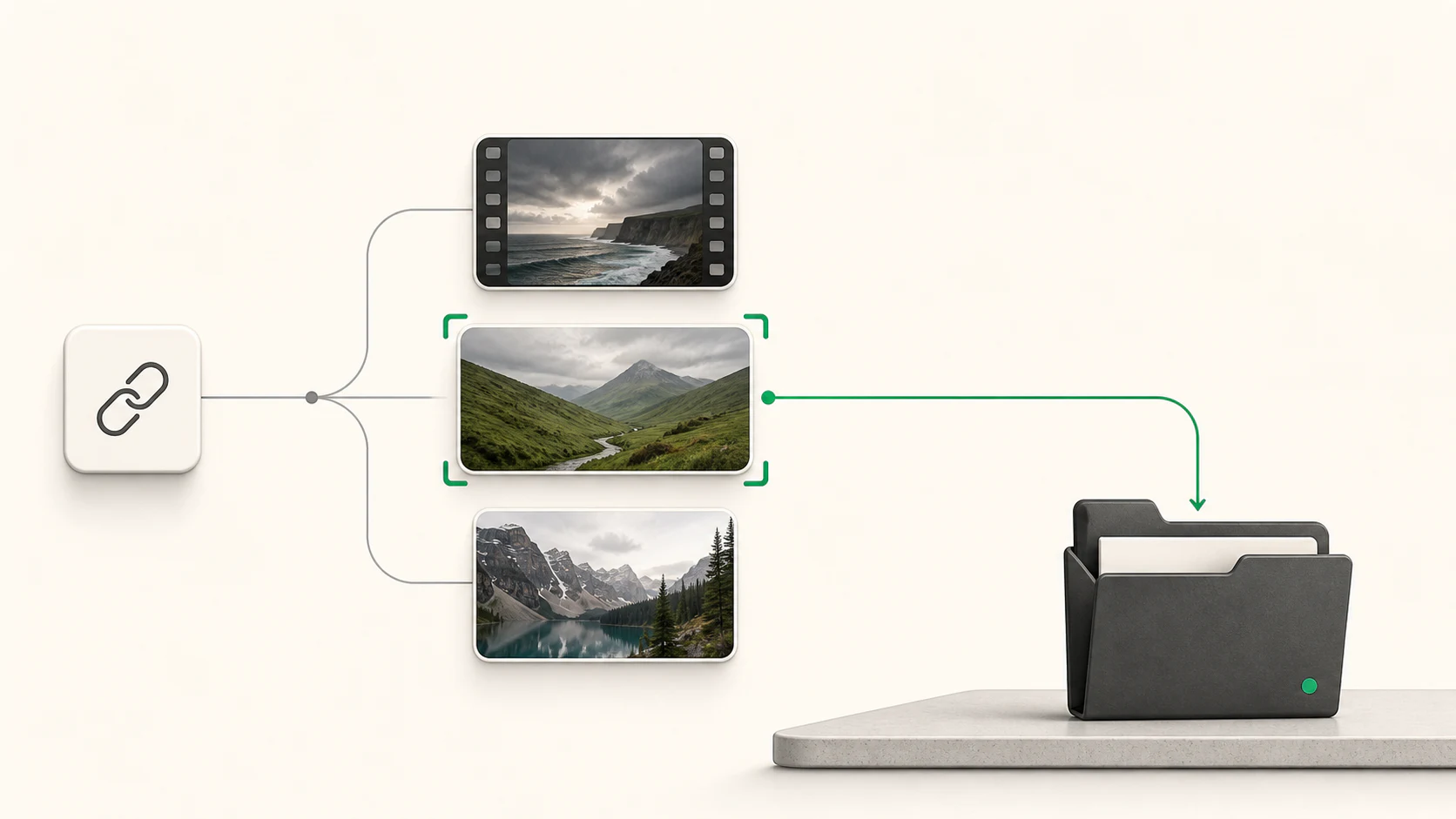
DownKit is for the moment when you can see useful media on a public page and want a focused way to inspect and save it.
1
Use a public HTTP or HTTPS page or a recognized direct media link. There is no browser extension or account to configure.
2
Review detected videos and images, switch between media types, and inspect the source-dependent choices before downloading.
3
Choose the items and qualities you want, select a destination, and let DownKit publish the completed files on your computer.
The entire workflow is visible before a download starts, so the result never feels like a mystery file from a mystery button.
DownKit validates the address and analyzes the public media it can access from your computer.
Choose video or images and compare the available source qualities. DownKit only shows tiers the source actually provides.
Select the files, pick a local destination, and download. One free credit is used only for each completed output file.
Try the full app with your own work before deciding whether to pay.
Download DownKit freeDownKit stays focused on accessible public sources rather than pretending it can unlock every website.
Inspect bounded media declarations on a public page without running page scripts, scrolling endlessly, or crawling other pages.
Open recognized direct video and image URLs after DownKit checks the final address, media type, structure, and decodability.
Use the recommended source or choose 1080p, 720p, or 480p only when that exact option exists.
Review more than one detected item and save the set you choose. Each successfully completed file uses one free credit.
DownKit separates analysis from downloading. It shows the accessible choices first and begins saving only after you make a selection.
Videos are shown first, images remain one click away, and quality labels reflect the source rather than an invented promise of universal resolution.
DownKit can recognize several direct-media source types, then normalizes completed downloads into predictable files on your computer.
Completed video downloads use one consistent container.
The image result depends on whether transparency must be preserved.
A recognized extension is not a guarantee. DownKit rechecks the final URL, media type, structure, and decodability. Animated images are saved as their first still frame.
Core analysis and media processing happen on your computer. DownKit does not send submitted links, media, or download history to a Nunuworks media-processing service, but it must contact the source to retrieve what you requested.
Analysis, previews, selection, quality inspection, failures, cancellations, and automatic retries do not use the allowance. No account or payment card is needed to try it.
For Apple silicon Macs running macOS 14 or newer.
Version 0.3.1
Download for Mac, Apple siliconFor Windows 11 computers with 64-bit x64 processors.
Version 0.3.1
Download for Windows, 64-bitThe Mac release requires Apple silicon. The Windows download is available for Windows 11 on x64. Windows purchasing and activation remain unavailable, and updates require a manual download.
US$19.99
Purchase happens inside DownKit on Mac through secure Stripe Checkout. The one-time license removes the five-file trial limit without promising that every source or file will work. Applicable tax is shown before payment. Windows purchasing and activation remain unavailable.
All sales are final, except where applicable law or the payment processor requires a refund or other remedy.
Request the same key again. For privacy, the form gives the same confirmation whether or not an eligible purchase exists.
Clear answers about files, privacy, free use, purchasing, and what DownKit does.
DownKit analyzes one public link, shows the accessible videos and images it can identify, lets you choose the media and available quality you want, and saves the completed files to your computer.
DownKit accepts public HTTP or HTTPS pages and recognized direct media links. It can inspect public sources understood by its local extraction engine and bounded media declarations in ordinary page markup. It does not promise every website or link.
Recognized direct video links include 3G2, 3GP, AVI, FLV, M4V, MKV, MOV, MP4, MPEG, MPG, OGG, OGV, and WebM. Recognized direct image links include AVIF, BMP, GIF, HEIC, HEIF, JPEG, PNG, TIFF, and WebP. DownKit still validates the final response before completing a file.
Videos are saved as MP4. Still images are saved as JPEG, or PNG when transparency needs to be preserved. Animated image sources are saved as their first still frame.
When available, DownKit shows a recommended source and adds 1080p, 720p, or 480p choices only if the source provides those exact tiers. The recommended source may be higher than 1080p. Not every link offers every choice.
One free credit is committed for each output file that finishes, passes verification, and is published to the destination you selected. A link or multi-file selection can therefore produce more than one counted file.
No. Analysis, previews, selection, quality inspection, failed work, cancelled work, incomplete temporary files, and automatic retries do not consume a free-file credit.
No Nunuworks media-processing service receives your submitted links, detected media, or download history. Your computer still makes the ordinary network requests needed to inspect the public link and retrieve the selected media, so the source and network can see those requests.
No. DownKit does not import browser cookies, sign in, bypass DRM or encryption, solve CAPTCHAs, cross paywalls, defeat subscriptions, or circumvent access controls. Only download media you own or have permission to use.
Public pages and links can change or expire without notice. DownKit revalidates the selected media before downloading, and a source that worked previously may stop working when its website or delivery method changes.
DownKit is available for Apple silicon Macs running macOS 14 or newer. A Windows 11 x64 download is also available, with manual updates. Windows purchasing and license activation remain unavailable.
US$19.99 plus applicable tax removes the five-file trial limit. The key does not expire and includes DownKit updates Nunuworks publicly releases for this license, without promising a particular feature, schedule, or future operating-system compatibility.
Yes. One perpetual key covers up to three active devices owned or primarily used by the purchaser. Activation and deactivation use the licensing service; after activation, the signed device entitlement is checked locally without periodic license-server checks.
No. The free trial needs no account, email, payment card, or reduced-quality mode. The paid license is a one-time purchase rather than a subscription.
Download the desktop app and complete the first five output files before deciding whether to unlock it.
 PhotoSlopUse simple written instructions to create images, edit photos, and remove backgrounds with AI while keeping each project version on your computer.
 FileConverterConvert images, audio, video, archives, PDFs, and Office documents on your computer without uploading them to Nunuworks or changing the originals.